The software development landscape is undergoing a seismic shift, driven by the rapid advancement of artificial intelligence. This transformation transcends simple automation; it fundamentally alters how software is created, acquired, and utilized, leading to a re-evaluation of the traditional 'build versus buy' calculus. The pace of this transformation is likely to accelerate, making it crucial for businesses and individuals to stay adaptable and informed.
For decades, the software industry has been shaped by a tension between bespoke, custom-built solutions and readily available commercial products. The complexity and cost associated with developing software tailored to specific needs often pushed businesses towards purchasing off-the-shelf solutions, even if those solutions weren't a perfect fit. This gave rise to the dominance of large software vendors and the Software-as-a-Service (SaaS) model. However, AI is poised to disrupt this paradigm.
Large Language Models (LLMs) are revolutionizing software development by understanding natural language instructions and generating code snippets, functions, or even entire modules. Imagine describing a software feature in plain language and having an AI produce the initial code. Many are already using tools like ChatGPT in this way, coaching the AI, suggesting revisions, and identifying improvements before testing the output.
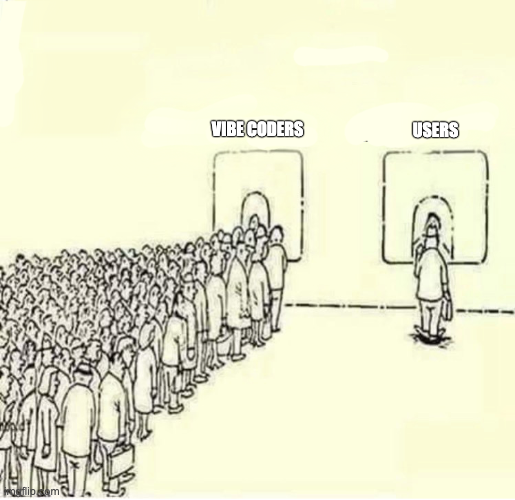
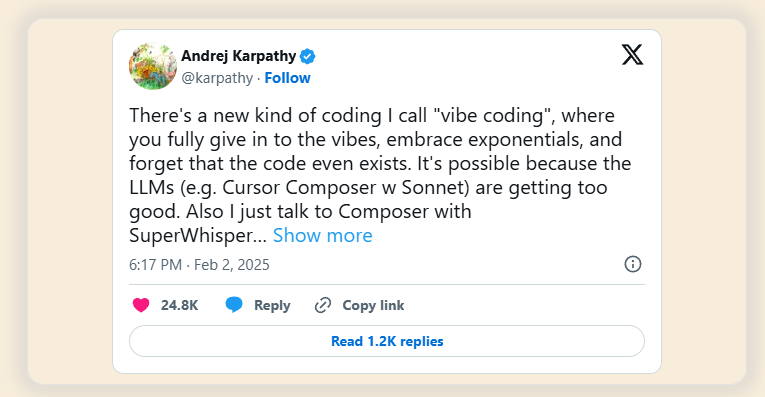
This is 'vibe coding,' where senior engineers guide LLMs with high-level intent rather than writing every line of code. While this provides a significant productivity boost—say, a 5x improvement—the true transformative potential lies in a one-to-many dynamic, where a single expert can exponentially amplify their impact by managing numerous AI agents simultaneously, each focused on different project aspects.
Additionally, AI is being used for code review tools that can automatically identify potential issues and suggest improvements, and specific AI platforms offered by cloud providers like AWS CodeWhisperer and Google Cloud's AI Platform are providing comprehensive AI-driven development environments. AI is being used for AI-assisted testing and debugging, identifying potential bugs, suggesting fixes, and automating test cases.
Beyond code completion and generation, AI tools are also facilitating the development of reusable components and services. This move toward composable architectures allows developers to break down complex tasks into smaller, modular units. These units, powered by AI, can then be easily assembled and orchestrated to create larger applications, increasing efficiency and flexibility. Model Context Protocol (MCP) could play a role in standardizing the discovery and invocation of these services.
Furthermore, LLM workflow orchestration is also becoming more prevalent, where AI models can manage and coordinate the execution of these modular services. This allows for dynamic and adaptable workflows that can be quickly changed or updated as needed.
However, it's crucial to recognize that AI is a tool. Humans will still be needed to guide its development, provide creative direction, and critically evaluate the AI-generated outputs. Human problem-solving skills and domain expertise remain essential for ensuring software quality and effectiveness.
These tools are not just incremental improvements; they have the potential to dramatically increase developer productivity, potentially enabling the same output with half the staff or even leading to a fivefold increase in efficiency in the near term, lower the barrier to entry for software creation, and enable the fast iteration of new features.
Furthermore, AI tools have the potential to level the playing field for offshore development teams. Traditionally, challenges such as time zone differences, communication barriers, and perceived differences in skill level have sometimes put offshore teams at a disadvantage. However, AI-powered development tools can mitigate these challenges:
- Enhanced Productivity and Efficiency: AI tools can automate many tasks, allowing offshore teams to deliver faster and more efficiently, overcoming potential time zone delays.
- Improved Code Quality and Consistency: AI-assisted code generation, review, and testing tools can ensure high code quality and consistency, regardless of the team's location.
- Reduced Communication Barriers: AI-powered translation and documentation tools can facilitate clearer communication and knowledge sharing.
- Access to Cutting-Edge Technology: With cloud-based AI tools, offshore teams can access the same advanced technology as onshore teams, eliminating the need for expensive local infrastructure.
- Focus on Specialization: Offshore teams can specialize in specific AI-related tasks, such as AI model training, data annotation, or AI-driven testing, becoming highly competitive in these areas.
By embracing AI tools, offshore teams can overcome traditional barriers and compete on an equal footing with onshore teams, offering high-quality software development services at potentially lower costs. This could lead to a more globalized and competitive software development landscape.
This evolution is leading to an explosion of new software products and features. Individuals and small teams can now bring their ideas to life with unprecedented speed and efficiency. This is made possible by AI tools that can quickly translate high-level descriptions into working code, allowing for quicker prototyping and development cycles.
Crucial to the effectiveness of these AI tools is the quality of their training data. High-quality, diverse datasets enable AI models to generate more accurate and robust code. This is particularly impactful in niche markets, where highly specialized software solutions, previously uneconomical to develop, are now becoming viable.
For instance, AI could revolutionize enterprise applications with greater automation and integration capabilities, lead to more personalized and intuitive consumer apps, accelerate scientific discoveries by automating data analysis and simulations, or make embedded systems more intelligent and adaptable.
Furthermore, AI can analyze user data to identify areas for improvement and drive innovation, making software more responsive to user needs. While AI automates many tasks, human creativity and critical thinking are still vital for defining the vision and goals of software projects.
It's important to consider the potential environmental impact of this increased software development, including the energy consumption of training and running AI models. However, AI-driven software also offers opportunities for more efficient resource management and sustainability in other sectors, such as optimizing supply chains or reducing energy waste.
Software will evolve at an unprecedented pace, with AI facilitating fast feature iteration, updates, and highly personalized user experiences. This surge in productivity will likely lead to an explosion of new software products, features, and niche applications, democratizing software creation and lowering the barrier to entry.
This evolution is reshaping the commercial software market. The proliferation of high-quality, AI-enhanced open-source alternatives is putting significant pressure on proprietary vendors. As companies find they can achieve their software needs through internal development or by leveraging robust open-source solutions, they are becoming more price-sensitive and demanding greater value from commercial offerings.
This is forcing vendors to innovate not only in terms of features but also in their business models, with a greater emphasis on value-added services such as consulting, support, and integration expertise. Strategic partnerships and collaboration with open-source communities will also become crucial for commercial vendors to remain competitive.
Commercial software vendors will need to adapt to this shift by offering their functionalities as discoverable services via protocols like MCP. Instead of selling large, complex products, they might provide specialized services that can be easily integrated into other applications. This could lead to new business models centered around providing best-in-class, composable AI capabilities.
Specifically, this shift is leading to changes in priorities and value perceptions. Commercial software vendors will likely need to shift their focus towards providing value-added services such as consulting, support, and integration expertise as open-source alternatives become more competitive. Companies may place a greater emphasis on software that can be easily customized and integrated with their existing systems, potentially leading to a demand for more flexible and modular solutions.
Furthermore, commercial vendors may need to explore strategic partnerships and collaborations with open-source communities to remain competitive and utilize the collective intelligence of the open-source ecosystem.
Overall, AI-driven development has the potential to transform the software landscape, creating a more level playing field for open-source projects and putting significant pressure on the traditional commercial software market. Companies will likely need to adapt their strategies and offerings to remain competitive in this evolving environment.
The open-source ecosystem is experiencing a significant transformation driven by AI. AI-powered tools are not only lowering the barriers to contribution, making it easier for developers to participate and contribute, but they are also fundamentally changing the competitive landscape.
Specifically, AI fuels the creation of more robust, feature-rich, and well-maintained open-source software, making these projects even more viable alternatives to commercial offerings. Businesses, especially those sensitive to cost, will have more compelling free options to consider. This acceleration is leading to faster feature parity, where AI could enable open-source projects to rapidly catch up to or even surpass the feature sets of commercial software in certain domains, further reducing the perceived value proposition of paid solutions.
Moreover, the ability for companies to customize open-source software using AI tools could eliminate the need for costly customization services offered by commercial vendors, potentially resulting in customization at zero cost. The agility and flexibility of open-source development, aided by AI, enable quick innovation and experimentation, allowing companies to try new features and technologies more quickly and potentially reducing their reliance on proprietary software that might not be able to keep pace.
AI tools can also help expose open-source components as discoverable services, making them even more accessible and reusable. This can further accelerate the development and adoption of open-source software, as companies can easily integrate these services into their own applications.
Furthermore, the vibrant and collaborative nature of open-source communities, combined with AI tools, provides companies with access to a vast pool of expertise and support at no additional cost. This is accelerating the development cycle, improving code quality, and fostering an even more collaborative and innovative environment. As open-source projects become more mature and feature-rich, they present an increasingly compelling alternative to commercial software, further fueling the shift away from traditional proprietary solutions.
Ultimately, the rise of AI in software development is driving a fundamental shift in the "build versus buy" calculus. The rise of composable architectures means that 'building' now often entails assembling and orchestrating existing services, rather than developing everything from scratch. This dramatically lowers the barrier to entry and makes building tailored solutions even more cost-effective.
Companies are finding that building their own tailored solutions, often on cloud infrastructure, is becoming increasingly cost-effective and strategically advantageous. The ability for companies to customize open-source software using AI could eliminate the need for costly customization services offered by commercial vendors.
Innovation and experimentation in open-source, aided by AI, could further reduce reliance on proprietary software. Robotic Process Automation (RPA) bots can also be exposed as services via MCP, allowing companies to integrate automated tasks into their workflows more easily. This further enhances the 'build' option, as businesses can employ pre-built RPA services to automate repetitive processes.
The potential for AI-driven, easier on-premise app development could indeed have significant implications for the cloud versus on-premise landscape, potentially leading to a shift in reliance on big cloud applications like Salesforce.
There's potential for reduced reliance on big cloud apps. If AI tools drastically simplify and accelerate the development of custom on-premise applications, companies that previously opted for cloud solutions due to the complexity and cost of in-house development might reconsider. They could build tailored solutions that precisely meet their unique needs without the ongoing subscription costs and potential vendor lock-in associated with large cloud platforms.
Furthermore, for organizations with strict data sovereignty requirements, regulatory constraints, or internal policies favoring on-premise control, the ability to easily build and maintain their own applications could be a major advantage. They could retain complete control over their data and infrastructure, addressing concerns that might have pushed them towards cloud solutions despite these preferences.
While cloud platforms offer extensive customization, truly bespoke requirements or deep integration with legacy on-premise systems can sometimes be challenging or costly to achieve. AI-powered development could empower companies to build on-premise applications that seamlessly integrate with their existing infrastructure and are precisely tailored to their workflows.
Composable architectures can also make on-premise development more manageable. Instead of building large, monolithic applications, companies can assemble smaller, more manageable services. This can reduce the complexity of on-premise development and make it a more viable option.
Additionally, while the initial investment in on-premise infrastructure and development might still be significant, the elimination of recurring subscription fees for large cloud platforms could lead to lower total cost of ownership (TCO) over the long term, especially for organizations with stable and predictable needs.
Finally, some organizations have security concerns related to storing sensitive data in the cloud, even with robust security measures in place. The ability to develop and host applications on their own infrastructure might offer a greater sense of control and potentially address these concerns, even if the actual security posture depends heavily on their internal capabilities.
However, several factors might limit the shift away from big cloud apps:
Cloud platforms like Salesforce offer more than just the application itself. They provide a comprehensive suite of services, including infrastructure management, scalability, security updates, platform maintenance, and often a rich ecosystem of integrations and third-party apps. Building and maintaining all of this in-house, even with AI assistance, could still be a significant undertaking.
Moreover, major cloud vendors invest heavily in research and development, constantly adding new features and capabilities, often leveraging cutting-edge AI themselves. This pace of innovation in the cloud might be difficult for on-premise development, even with AI tools, to keep pace with.
Cloud platforms are inherently designed for scalability and elasticity, allowing businesses to easily adjust resources based on demand. Replicating this level of flexibility on-premise can be complex and expensive. Many companies prefer to focus on their core business activities rather than managing IT infrastructure and application development, even if AI makes it easier; the "as-a-service" model offloads this burden.
Large cloud platforms often have vibrant ecosystems of developers, partners, and a wealth of documentation and community support. Building an equivalent internal ecosystem for on-premise development could be challenging. Some advanced features, particularly those leveraging large-scale data analytics and AI capabilities offered by the cloud providers themselves, might be difficult or impossible to replicate effectively on-premise.
Cloud providers might also shift towards offering more granular, composable services that can be easily integrated into various applications. This would allow companies to leverage the cloud's scalability and infrastructure while still maintaining flexibility and control over their applications.
Therefore, a more likely scenario might be the rise of hybrid approaches, where companies use AI to build custom on-premise applications for specific, sensitive, or highly customized needs, while still relying on cloud platforms for other functions like CRM, marketing automation, and general productivity tools.
While the advent of AI tools that simplify on-premise application development could certainly empower more companies to build their own solutions and potentially reduce their reliance on monolithic cloud applications like Salesforce, a complete exodus is unlikely. The value proposition of cloud platforms extends beyond just the software itself to encompass infrastructure management, scalability, innovation, and ecosystem.
Companies will likely weigh the benefits of greater control and customization offered by on-premise solutions against the convenience, scalability, and breadth of services provided by the cloud. We might see a more fragmented landscape where companies strategically choose the deployment model that best fits their specific needs and capabilities.
The integration of advanced AI into software development is poised to trigger a profound shift, fundamentally altering how software is created, acquired, and utilized. This shift is characterized by:
AI as a Force Multiplier: AI tools are drastically increasing developer productivity, potentially enabling the same output with half the staff or even leading to a fivefold increase in efficiency in the near term.
Cambrian Explosion of Software: This surge in productivity will likely lead to an explosion of new software products, features, and niche applications, democratizing software creation and lowering the barrier to entry.
Rapid Iteration and Personalization: Software will evolve at an unprecedented pace, with AI facilitating fast feature iteration, updates, and highly personalized user experiences. This will often involve complex LLM workflow orchestration to manage and coordinate the various AI-driven processes.
This impact will be felt across various types of software, from enterprise solutions to consumer apps, scientific tools, and embedded systems. The effectiveness of these AI tools relies heavily on the quality of their training data, and the ability to analyze user data will drive further innovation and personalization.
We must also consider the sustainability implications, including the energy consumption of AI models and the potential for AI-driven software to promote resource efficiency in other sectors. These changes are not static; they are part of a dynamic and rapidly evolving landscape. Tools like GitHub Copilot and AWS CodeWhisperer are already demonstrating the power of AI in modern development workflows.
Evolving Roles: The traditional role of a "coder" will diminish, with remaining developers focusing on AI prompt engineering, system architecture, including the design and management of complex LLM workflow orchestration, integration, service orchestration, MCP management, quality assurance, and ethical considerations.
This shift is particularly evident in the rise of vibe coding. More significantly, we're moving towards a one-to-many model where a single subject matter expert (SME) or senior engineer will manage and direct many LLM coding agents, each working on different parts of a project. This orchestration of AI agents will dramatically amplify the impact of senior engineers, allowing them to oversee and guide complex projects with unprecedented efficiency.
AI-Native Companies: New companies built around AI-driven development processes will emerge, potentially disrupting established software giants.
Democratization of Creation: Individuals in non-technical roles will become "citizen developers," creating and customizing software with AI assistance.
Automation Across Industries: The ease of creating custom software will accelerate automation in all sectors, leading to increased productivity but also potential job displacement.
Lower Software Costs: Development cost reductions will translate to lower software prices, making powerful tools more accessible.
New Business Models: New ways to monetize software will emerge, such as LLM features, data analytics, integration services, and specialized composable services offered via MCP.
Workforce Transformation: Educational institutions will need to adapt to train a workforce for skills like AI ethics, prompt engineering, and high-level system design.
Ethical and Security Concerns: Increased reliance on AI raises ethical concerns about bias, privacy, and security vulnerabilities. This includes the challenges of handling sensitive data when using AI tools.
Short-Term vs. Long-Term: Businesses must balance immediate needs with the potential for cheaper and better AI-driven alternatives in the future.
Flexibility and Scalability: Prioritizing flexible, scalable, and cloud-based solutions is crucial.
Avoiding Lock-In: Companies should be cautious about long-term contracts and proprietary solutions that might become outdated quickly.
AI-Powered Development: Firebase Studio's integration of Gemini and AI agents for prototyping, feature development, and code assistance exemplifies the trend towards AI-driven development environments.
Rapid Prototyping and Iteration: The ability to create functional prototypes from prompts and iterate quickly with AI support validates the potential for an explosion of new software offerings.
In essence, the AI-driven software revolution represents a fundamental shift in the "build versus buy" calculus, empowering businesses and individuals to create tailored solutions more efficiently and affordably. While challenges exist, the long-term trend points towards a more open, flexible, and dynamic software ecosystem. It's important to remember that AI is a tool that amplifies human capabilities, and human ingenuity will remain at the core of software innovation.
In conclusion, the advancements in AI are ushering in an era of unprecedented change in software development. This transformation promises to democratize software creation, accelerate innovation, and empower businesses to build highly customized solutions. While challenges remain, the long-term trend suggests a move towards a more open, composable, flexible, and user-centric software ecosystem, increasingly driven by discoverable services. Furthermore, the pace of these changes is likely to accelerate, making adaptability and continuous learning crucial for both businesses and individuals.