Chat Interface#
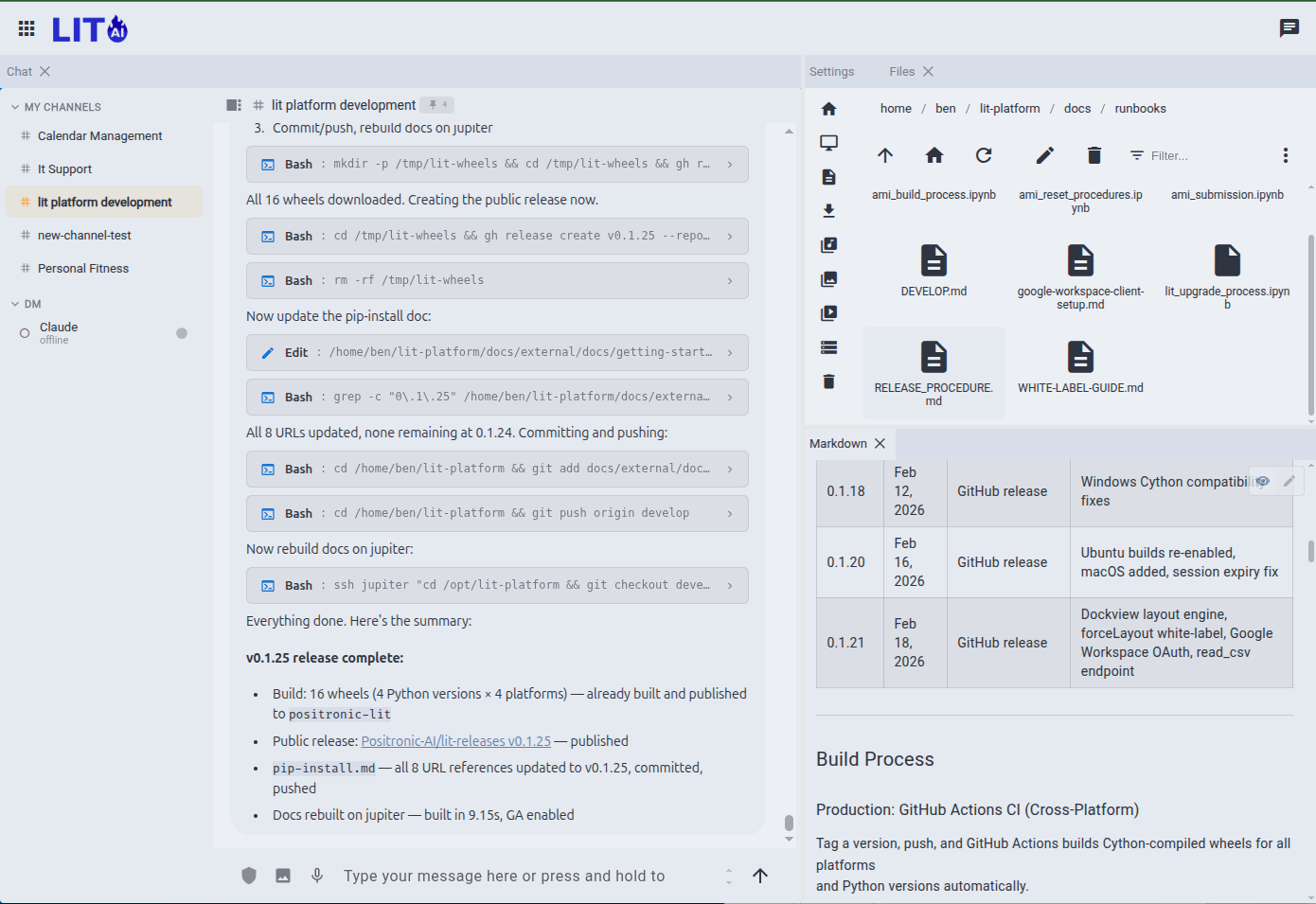
The LIT Platform chat interface is the primary way to interact with your AI agents. A full-featured workspace for conversations, multi-session history, voice input, and real-time streaming.
What You Get#
Multi-Agent Conversations#
Create and manage multiple agents, each with their own personality, system prompt, tool access, and model selection. Switch between agents in the sidebar. Sessions are persisted — pick up any conversation where you left off.
Streaming Responses#
Responses stream token-by-token as the AI generates them. Tool calls (file edits, web searches, code execution) show inline as they happen. You see the agent's full inner monologue — not a sanitized summary.
For data science work, this means watching your AI read a dataset, write a feature, run a training experiment, and report back — every file read and command visible as it happens. This is vibe data science: you direct, the AI executes, and nothing is hidden.
Every message carries its receipt#
Each reply is stamped with what it cost and how long it took: time to first byte and time to first content, the exact model that answered, the timestamp, and input and output token counts, with cache tokens in the tooltip. It is on every message, not in a report you have to go and find. Switch models mid-channel and the receipts show you, message by message, which one was faster and which one was cheaper. The same numbers feed the team ledger under Seats & Policy.
Voice Input#
Click and hold the microphone button to record. Speech-to-text transcribes your message before sending. Works on desktop and mobile browsers that support the Web Speech API.
Image Upload#
Attach images directly to messages. Drag and drop or use the paperclip button. Images are sent inline with your message to multimodal-capable models.
Model & Backend Selection#
Switch AI providers and models per session. Claude, Gemini, and ChatGPT backends are available depending on which you configured at setup. The active model is shown in the session header.
Setup Wizard#
On first launch, the setup wizard walks you through connecting an AI provider. Claude is our recommended default — it delivers the best results with LIT Platform's agentic features.
- Claude: Requires a Claude Pro or Max subscription and the Claude CLI (
npm install -g @anthropic-ai/claude-code) - Gemini: Free API key from Google AI Studio — no additional software required
- ChatGPT: OpenAI account and the Codex CLI (
npm install -g @openai/codex)
Agent Settings#
Click the gear icon on any agent to configure:
| Setting | Description |
|---|---|
| Name & role | Display name and role description shown in the UI |
| System prompt | Instructions that shape the agent's behavior for every conversation |
| Model | AI model selection (Claude Sonnet, Gemini Flash, GPT-4o, etc.) |
| MCP tools | External tool integrations (Google Workspace, custom servers) |
| Heartbeat | Enable autonomous scheduling for this agent |
Channels & Direct Messaging#
Agents aren't limited to the main chat. You can open dedicated channel workspaces for ongoing projects, or message agents directly through DM threads. Channel history persists independently from regular sessions.
Keyboard Shortcuts#
| Action | Shortcut |
|---|---|
| Send message | Enter |
| New line in message | Shift+Enter |
| New session | Cmd/Ctrl+N |
| Search sessions | Cmd/Ctrl+K |
| Toggle sidebar | Cmd/Ctrl+B |
Mobile#
The interface is responsive and works on mobile browsers. Voice input is the primary input method on mobile — tap and hold the mic button to dictate your message. Session switching is available via a dropdown when the sidebar is collapsed.
Data & Privacy#
All conversations are stored locally in ~/.config/lit/ on the machine running lit serve. Nothing is sent to LIT.AI servers. Your data stays on your infrastructure.