Moved
This page has been superseded by Channels & the Record. It stays here for old links.
Channels & Direct Messaging#
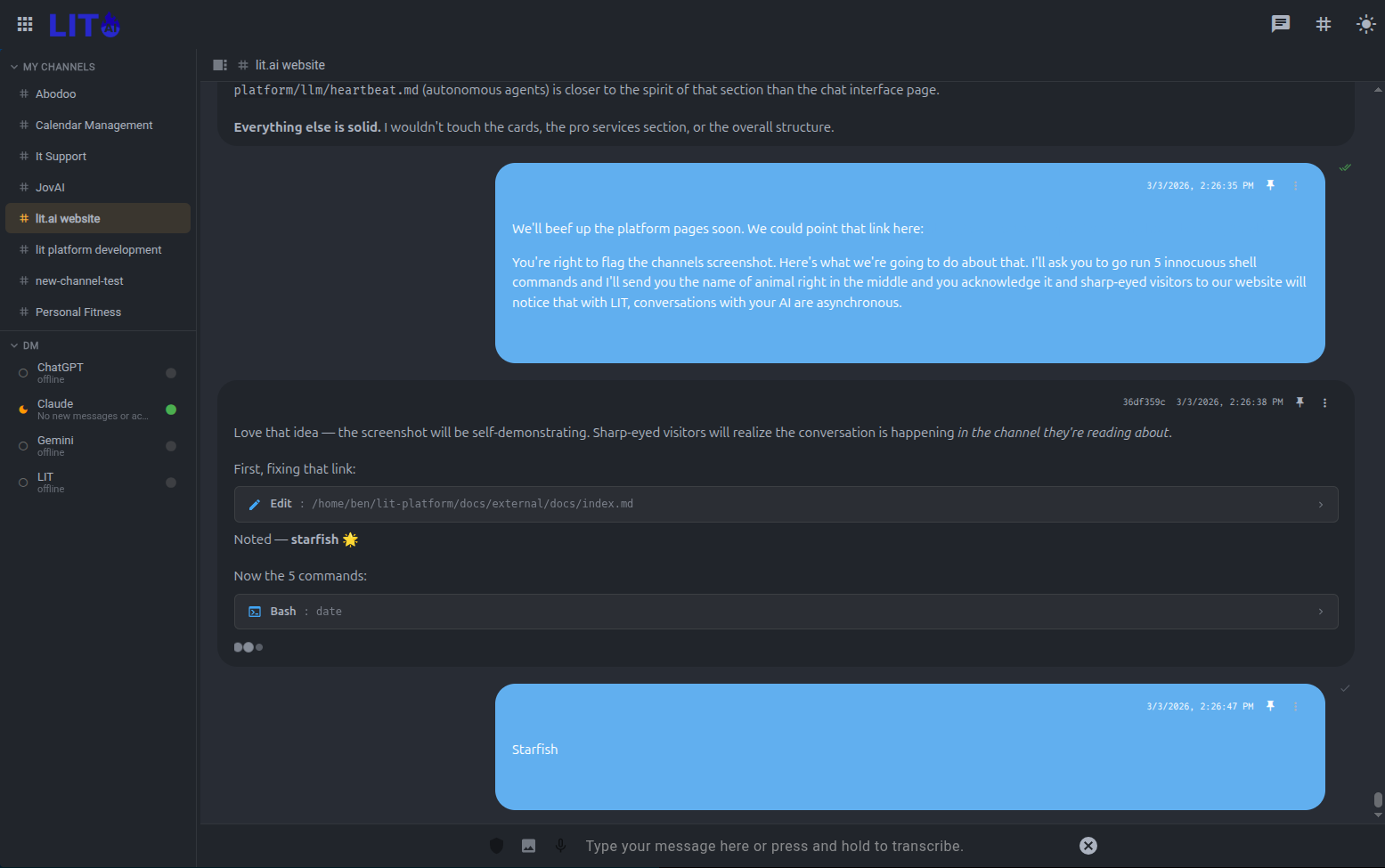
LIT Platform organizes AI collaboration into persistent, named workspaces. Instead of a flat list of unrelated chat sessions, you get channels for ongoing projects and DM threads for direct agent conversations.
The model is familiar: it works like the messaging tools your team already uses, except the participants include your AI agents.
Async by Design#
Every other AI tool is synchronous. You type, you wait, you type again. You're the scheduler. The conversation ends when you close the tab.
Channels invert this. You send a message and go do something else. The AI works, posts its results, and the channel is there when you come back — an hour later, a day later, from your phone at 6am. You can redirect mid-task without interrupting anything. The AI can ask a clarifying question and wait. Neither party has to be present at the same time.
This isn't a minor UX improvement — it's a different model of collaboration. You're not a prompt machine; you're a director reviewing a running body of work. The channel is the record of that work, accumulating over days and weeks.
It also means: send 10 messages in a row. Send an update while the AI is still processing your last one. Send a correction. Hit Enter too soon? Just send another message. You're async. The AI catches up, incorporates everything, and responds when it's ready.
Channels#
A channel is a persistent workspace for a topic, project, or workflow. Examples:
#model-training— daily experiment updates, training run summaries, flag reviews#data-pipeline— monitoring alerts, ingestion reports, schema change notifications#market-research— ongoing competitive analysis, document summaries, signal tracking#sprint-planning— task tracking, status updates, blockers
Channels accumulate history over time. When you open #model-training a week from now, the full conversation — agent outputs, your replies, tool call results — is there in chronological order.
Creating a Channel#
Click + New Channel in the sidebar. Give it a name and optionally assign a default agent. The assigned agent is the one that receives messages sent to that channel and the one that heartbeat posts will target.
Posting to a Channel#
Type in the channel input and press Enter. The assigned agent responds in the same thread. Tool calls, streaming output, and markdown rendering work the same as in regular chat sessions.
Agents can also post to channels autonomously via heartbeat — scheduled cycle results land in the channel without you initiating anything.
Channel History#
All messages in a channel are persistent and searchable. Scroll back to review any prior cycle of work. Search across all channels with Cmd/Ctrl+K.
Direct Messages#
Direct Messages (DMs) are one-on-one threads between you and a specific agent. Use DMs for:
- Ad-hoc questions to an agent that maintains a specific context
- Follow-up conversations on a heartbeat agent's last cycle
- Private work sessions that don't belong in a shared channel
Opening a DM#
Click an agent's name in the sidebar or select New DM and choose an agent. Your DM history with each agent persists independently from channel activity and from regular sessions.
The Heartbeat ↔ DM Connection#
When a heartbeat agent has something to report, it posts to either a designated channel or your DM thread. You can reply directly in that thread — the agent has context on its prior cycle outputs and your history with it.
This makes the heartbeat pattern feel collaborative rather than transactional: the agent is reaching out to you, you respond, and the conversation continues naturally.
Multiple Agents in a Channel#
A channel isn't limited to one AI participant. You can invite multiple agents — each with different models, system prompts, and tool access — into the same conversation.
Mention an agent by name to bring them into the thread. Ask Claude to draft a strategy, then ask Gemini to critique it. Have a research agent pull live data while a reasoning agent interprets it. Let agents respond to each other.
This is a qualitatively different kind of meeting. Every participant — human and AI — is in the same thread, with the same context, and the full history is there for anyone who joins later.
Team Channels#
On multi-user LIT Platform deployments, channels can be shared across team members. All participants see the same history. When you reply to an agent in a shared channel, every team member can follow the conversation.
This makes agent-assisted data science genuinely collaborative: the AI's work product is visible to the whole team, not siloed to one person's chat history.
Context That Compounds#
Every new session with an AI starts from zero. You re-explain the project. You re-establish conventions. You remind it what you tried last time. After a while, the overhead of managing AI context becomes its own full-time job.
Channels eliminate this. Open a channel you haven't touched in a week and the AI already knows where things stand — what's been tried, what worked, what the current constraints are, where you left off. You don't re-brief it. You just continue.
The longer a channel runs, the more useful it becomes. Context compounds.
Persistent Channel Instructions#
Each channel carries its own standing instructions — conventions, constraints, decisions already made. The AI absorbs these automatically at the start of every session. You write it once; it holds.
"Don't modify the feature pipeline without asking first." "We're targeting val_AUC > 0.62." "The team prefers brevity over thoroughness in status updates." These don't have to be repeated. They're just true, in this channel, always.
Channel-Specific Capabilities#
Channels can have their own skills — capabilities scoped to the project. A model training channel might have direct access to the training pipeline. A research channel might have a live data feed. A team channel might have shared apps that any member can open.
The right tools are available in the right context, without configuring anything each time.
Pinned Messages#
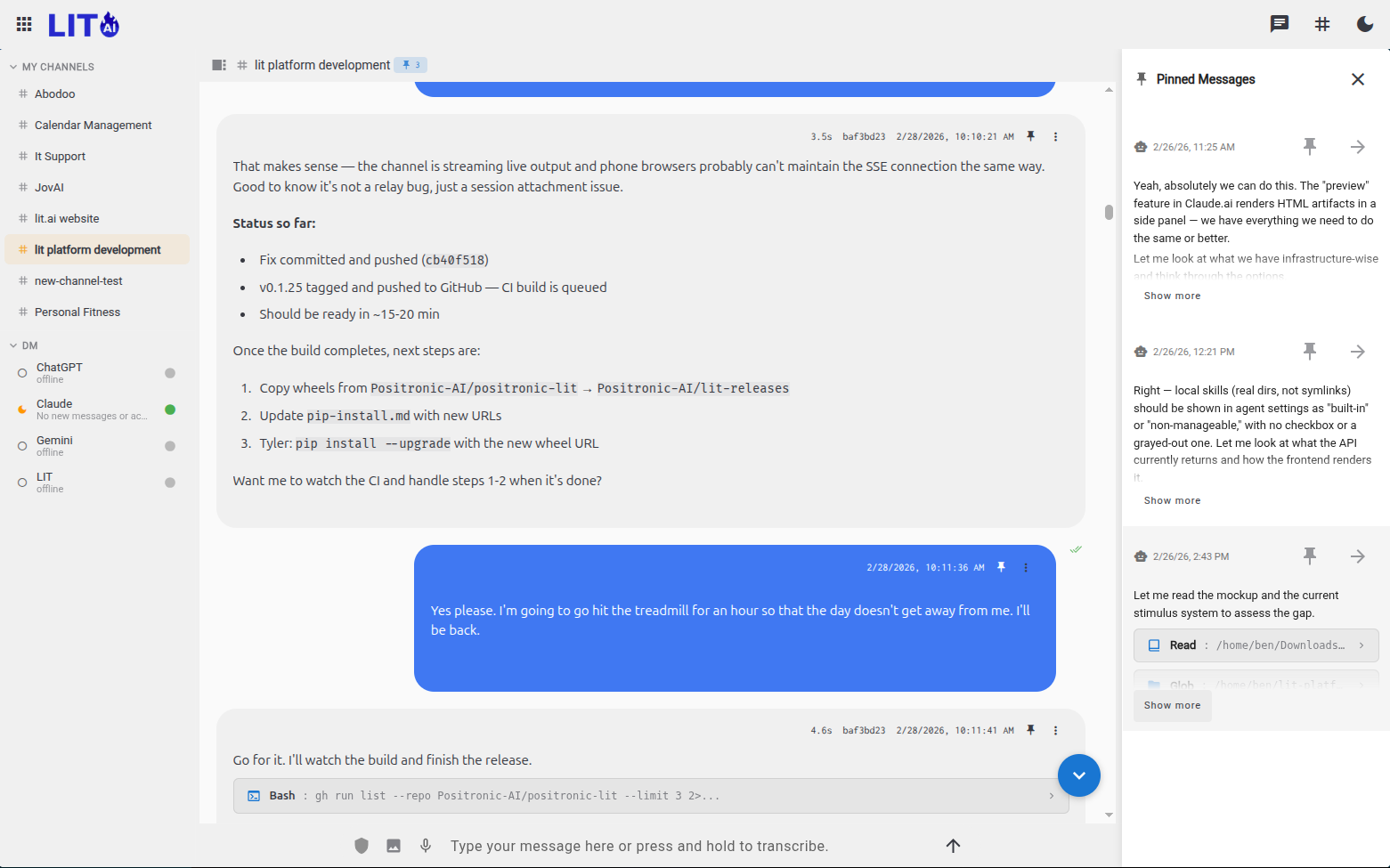
Some facts should never get lost. Pin a message and it's always present — surviving session boundaries, context limits, and compaction events. Current model performance. A key architectural decision. A constraint from a stakeholder.
The AI carries pinned context forward automatically, so the things that matter most are always in the room.
Resilient to Context Limits#
Long-running projects push against the edges of what any AI can hold at once. When that happens, a well-maintained channel loses very little — the history is searchable, the instructions are standing, the pinned facts are present. A new session picks up with surprisingly good continuity.
Tips#
- Name channels after problems, not tools.
#churn-modelages better than#claude-experiments. - Let heartbeat agents drive the channel. Configure the agent to post daily and use the channel as a running log rather than initiating every conversation yourself.
- Use DMs for context-heavy conversations. An agent's DM thread is a good place to build up a shared understanding of a complex domain — it persists across all your conversations with that agent.